.png?width=24&height=25&name=Network%201%20(1).png)


As buying cycles stretch and more stakeholders get involved, deal rooms have become a common part of B2B sales - here is how to download the template and start putting it to work.
The problem isn’t whether teams use deal rooms. It’s that most don’t know how to set them up in a way buyers actually use.
This guide walks through how to use Hive Perform’s Shared Deal Workspace Notion template to run cleaner, more effective deal rooms. From downloading the template, to using it in live deals, to keeping it updated as conversations progress.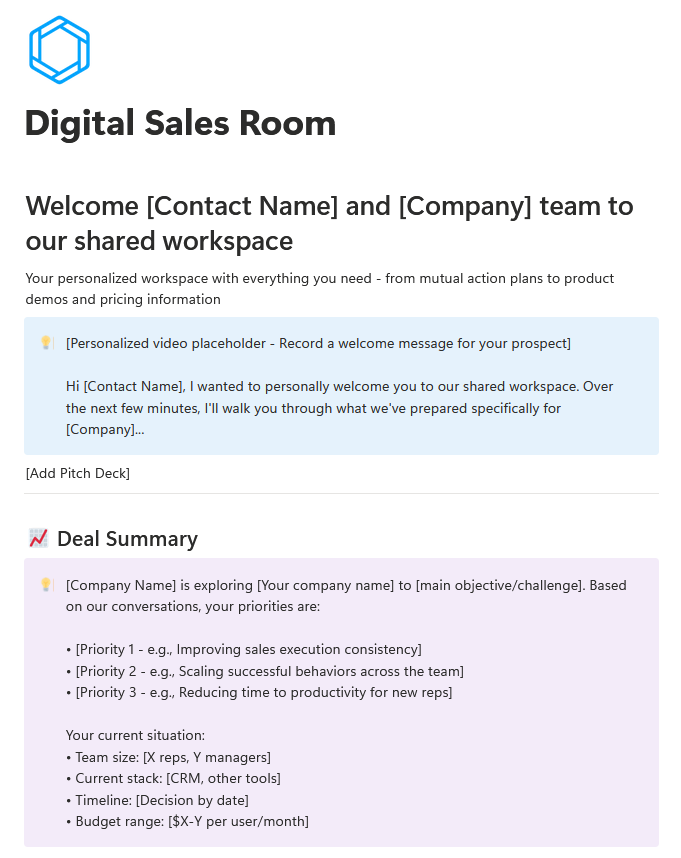
Step 1: Start with the Shared Deal Workspace template
This isn’t a generic framework. It’s a ready-to-use Notion deal room template built specifically for live B2B opportunities.
To get started:
-
Go to the Marketplace listing
- Click Get template
-
Add it to your Notion workspace
-
Duplicate it for each live deal
From there, you customise the workspace for the account and use it as the single place where the deal lives.
Step 2: Use the workspace to run the deal
Once duplicated, the template gives you a clear structure to work from.
It includes the following: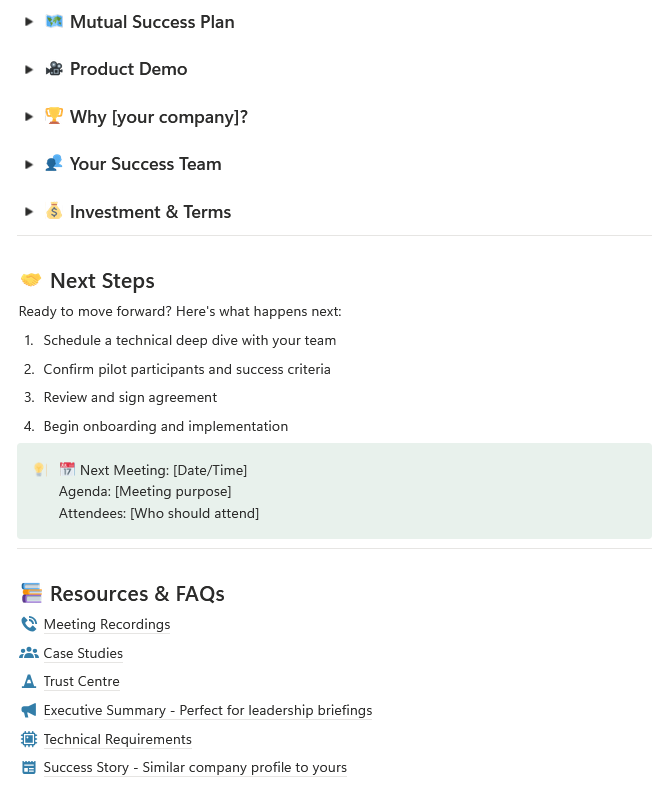
You don’t need to fill everything in at once. The workspace should evolve as the deal evolves.
Later in this guide, we’ll show how high-performing teams automate that evolution.
Step 3: Share it as a single source of truth
Share this deal room easily by pressing the 'Share' button in the top right, then publish to web.
.png?width=402&height=360&name=Track%20rep%20performance%20over%20time(7).png)
Instead of sending follow-up emails with links, notes, and attachments, you send one link. Champions can forward it internally. New stakeholders can get up to speed without another call.
It becomes the shared narrative everyone can rely on.
Why this template works
Most deal rooms fail because they turn into content folders.
This template works because it’s structured around the buying process, not your CRM stages. Each section exists to support a real buyer decision, not just store information.
That structure:
-
Reduces confusion for buyers
-
Makes life easier for internal champions
-
Keeps deals moving without constant follow-ups
When the workspace stays focused and current, buyers actually use it.
Useful on its own. Better with Hive Perform.
You can run this Notion deal room template manually, like any other shared document.
When paired with Hive Perform, the experience changes.
By connecting Hive Perform to Notion via our MCP server, key sections of the workspace can be updated automatically after each sales call. Deal context, priorities, risks, and next steps are pulled directly from real conversations, without reps rewriting summaries or chasing updates.
The structure stays the same, the difference is accuracy and momentum.
How teams use this in practice
Teams like Fospha have shown how effective this workflow can be.
Rather than manually maintaining deal rooms, they use Hive Perform to capture context from calls, emails, and stakeholder changes, then reflect that context directly in a shared deal workspace. An approach that earned recognition from Notion for their living deal rooms.
Buyers get a workspace they can trust and reps get a deal room that stays accurate without extra admin.
The takeaway
If you want deal rooms that buyers actually use, start with a structure that’s built for real deals.
The Shared Deal Workspace template gives you that structure out of the box. And when paired with Hive Perform, it becomes something your team can realistically keep up to date as deals progress.
Click Get template, add it to your Notion workspace, and use it in your next live deal.