



.png?width=24&height=25&name=Network%201%20(1).png)


What is Hive Perform?
Hive Perform is a sales intelligence layer that sits around your CRM, emails, and recorded calls. It automatically analyses your sales activity and turns it into deal-level insights, coaching feedback, and next-step recommendations. Rather than replacing any of your existing tools, it connects to them and surfaces the context you need to sell more effectively.
Think of it as an always-on layer that watches how your deals are progressing, checks whether you are following the playbook, and gives you practical nudges to keep things on track.
How Hive Analyses Your Calls
Hive Perform analyses your recorded sales calls to generate messaging scores, coaching feedback, and deal insights. For a call to be picked up and analysed, three things must be true:
- The call must be recorded via your connected call recording integration (e.g. Teams, Zoom, or similar).
- The meeting must exist in your calendar, and that calendar must be synced into your CRM so the call can be matched to the correct deal.
- A deal must exist in your CRM which has the associated contacts tagged within it
If any of these are missing, the call will not appear in Hive and no analysis will be generated - this prevent internal strategy and planning calls from being analysed. If you notice a call hasn't been picked up, check that the recording exists and that the calendar event was synced to your CRM with the right contacts tagged.
The Two Playbooks
Hive Perform is built around two core playbooks that define what good looks like for your team. Both are configurable and can evolve as your sales process and product or service messaging develops.
Messaging Playbook
The Messaging Playbook is your organisation's single source of truth for sales messaging. It defines the key selling points, value propositions, and objection-handling language that reps should be using on calls. Every completed call is scored against this playbook, so updates to your messaging are automatically reflected in how calls are evaluated.
This matters because it gives you a living reference for how Zip talks about its products and services. If messaging evolves after a repositioning, a new product launch, or feedback from the market, the playbook can be updated and every future call will be measured against the latest version.
Actions Playbook
The Actions Playbook defines the key steps that should be completed at each stage of a deal. Perform automatically detects whether actions have been completed, are in progress, or have been missed based on your calls, emails, and CRM activity.
Staying on top of these stage-specific actions directly impacts your Playbook Adherence score, which is visible on every deal. This score is a leading indicator of deal health. Deals with high adherence consistently progress further, while missed actions tend to correlate with deals that stall or are lost.
Check out the detail within each action to review how best to complete it. Your dashboard shows a summary of future, ongoing, completed and overdue actions.
</aside>
What Happens After a Sales Call
After each eligible recorded call, you will receive a messaging feedback email that includes your overall messaging score (out of 10) along with a breakdown of what you covered well and where you missed opportunities. This is generated automatically from the call transcript, so there is no manual input needed.
The email is designed to be a quick, actionable read. You can absorb the key takeaways in a couple of minutes. If you want to go deeper, the email links back into the Hive Perform platform where you can explore the full feedback breakdown, including:
- Feedback tab with a high-level summary of what went well and what could improve
- Pitch Technique tab with a detailed analysis of your sales technique, including specific missed opportunities and takeaways
- Evidence tab with timestamped transcript quotes showing exactly which moments informed the score
If there is an active coaching Initiative running (set up by your manager), you may also receive a separate score and feedback tied to that specific coaching focus.
The Deal Dashboard
The Deal Dashboard is the main landing page in Hive Perform. It gives you a live, filterable view of all active deals in your pipeline, organised by stage and enriched with action check indicators.
Make sure to select the relevant pipeline in the top left. Each pipeline is analysed independently
At the top, summary cards show your pipeline health (including how many deals are stalled, ghosted, or frozen), total pipeline value, and scheduled meetings for the week. Filter this page down to focus on deal stages or close dates.
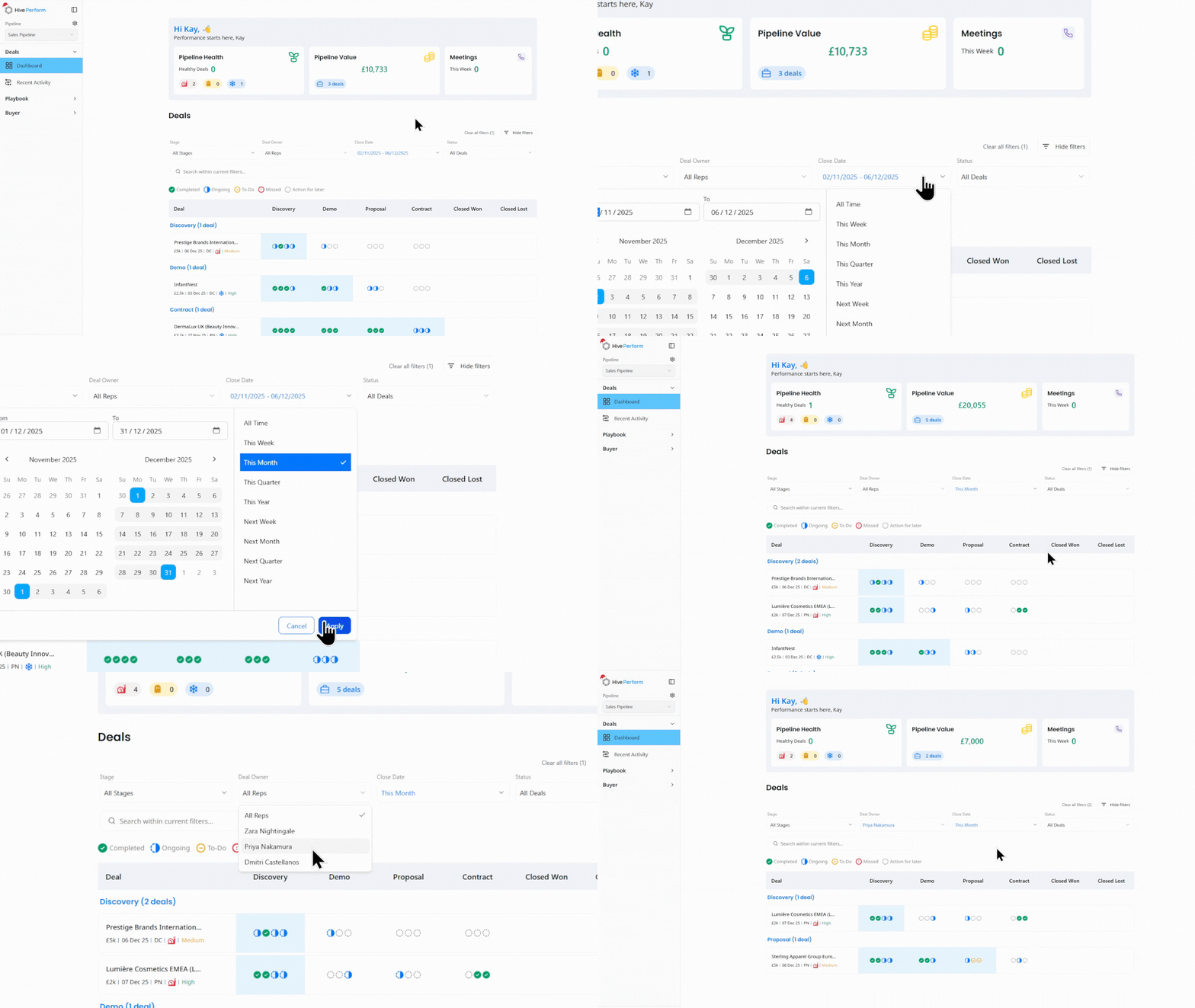
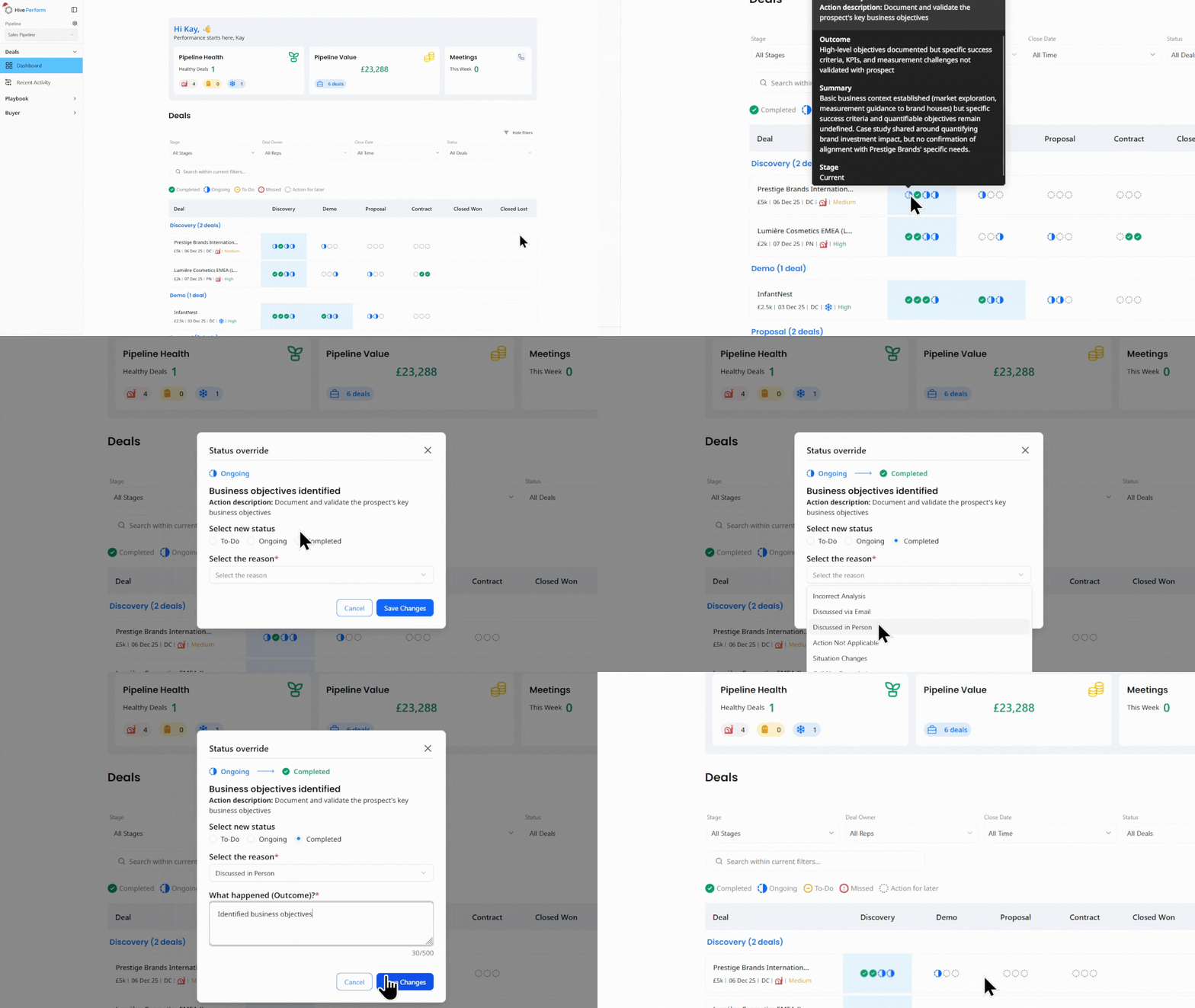
Each deal row shows a series of small icons representing the playbook actions for that stage. You can hover over any icon to see the action name, its status, and an option to manually override if the system hasn't detected an activity you know has happened.
Use the Status filter to surface at-risk deals:
- Stalled means the deal has been inactive for 15 days and is approaching its close date
- Ghosted means there has been no activity for 20 days
- Frozen means the deal is overdue with no recent activity
Think you’ve completed an Action that isn’t marked as complete? You can manually override an action if it was completed previously or elsewhere (eg. in person).
Using Deal Pages for Prep and Reviews
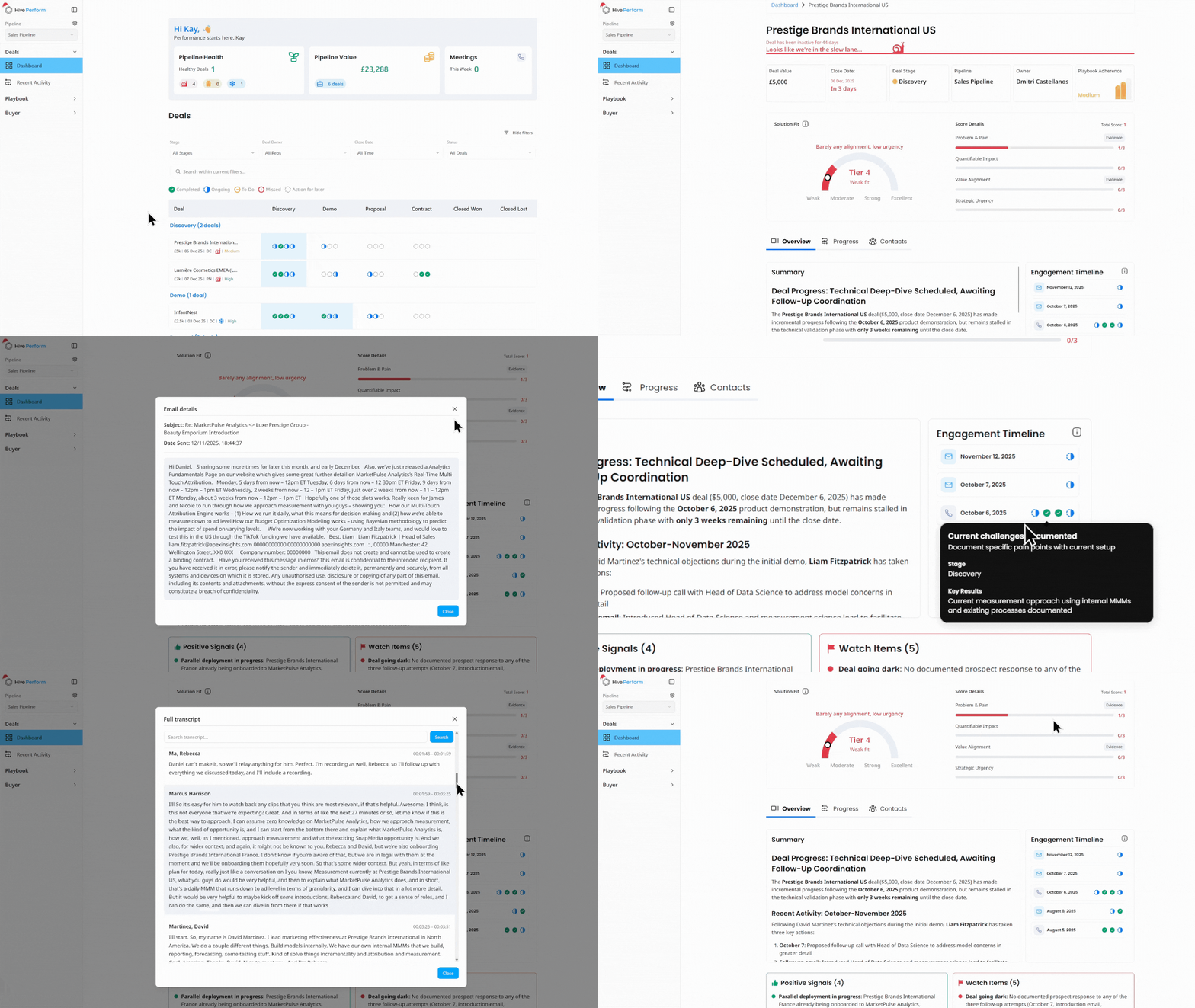
Every active deal in Perform has its own deal page that pulls together everything the platform knows about that opportunity. This is one of the most useful day-to-day features for an AE.
Meeting and Deal Prep
Before a call, open the deal page to quickly review:
- The summary analysis of where the deal currently stands, including recent progress and recommended next steps
- Positive Signals (things going well) and Watch Items (risks or gaps to address)
- The Contacts tab, which shows key stakeholder information, conversation starters, and communication style notes for each person on the deal
- Any upcoming call prep that Hive has generated, including suggested talking points based on the deal stage and outstanding actions
- An engagement timeline with when and how Actions have been completed.
Internal 1:1s and Deal Reviews
Deal pages are equally valuable for preparing for internal conversations. Before a 1:1 with your manager, pull up the deal page and use it to walk through:
- The deal summary and current stage
- Which playbook actions have been completed and which are outstanding
- Any objections that have surfaced and how they were handled
- The Solution Fit score, which shows how well your offering aligns with the prospect's stated needs across four dimensions: Problem and Pain, Quantifiable Impact, Value Alignment, and Strategic Urgency
This saves both of you time by replacing anecdotal updates with structured, evidence-based context.
Chat To Deal Feature
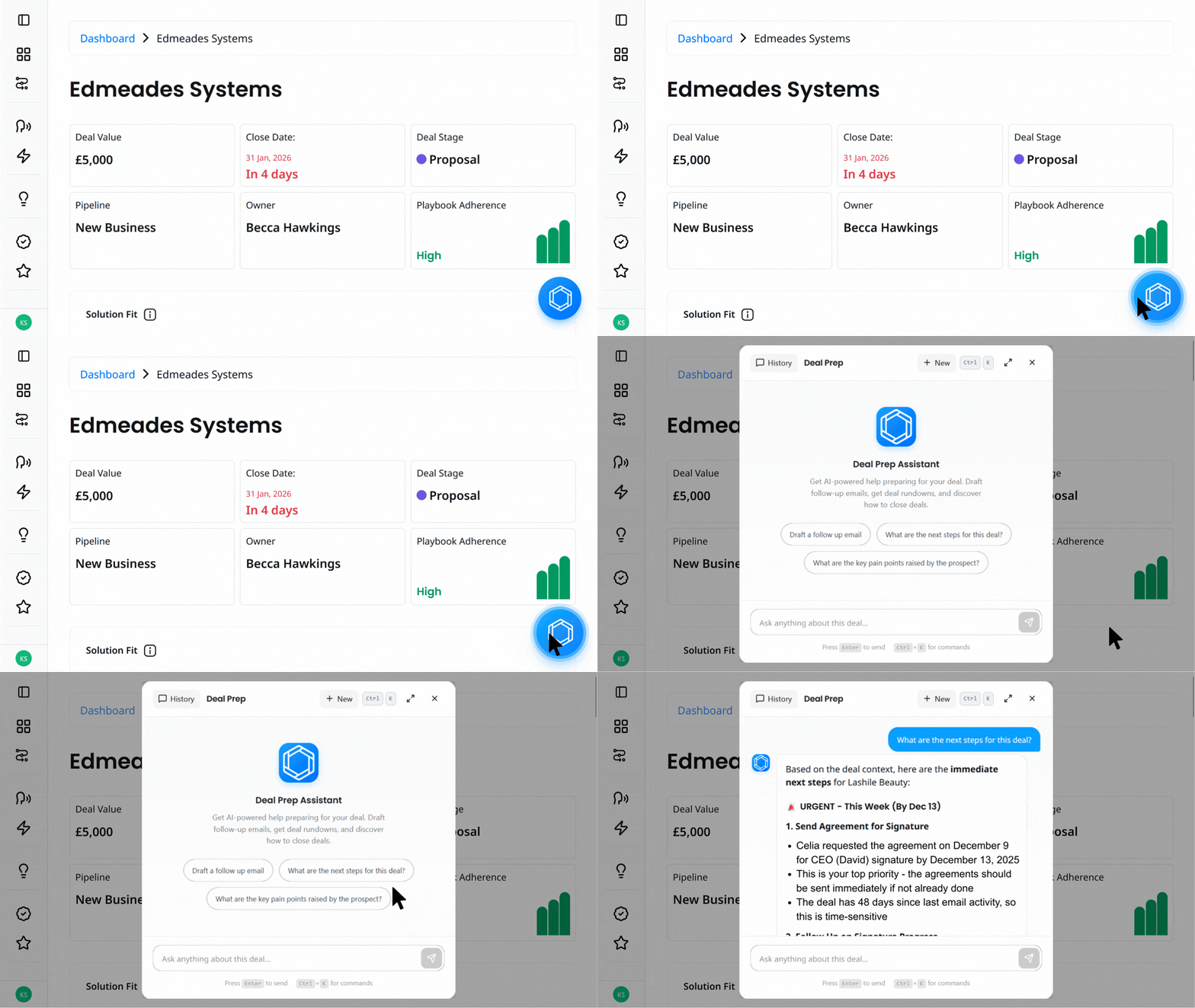
Each deal page includes a built-in AI assistant that lets you query all the context Hive has gathered for that deal. This includes call transcripts, emails, CRM data, and any analysis that has been generated.
You can use it to ask natural-language questions like:
- "What objections has this prospect raised so far?"
- "Has budget been mentioned in any interaction?"
- "Can you draft me a follow up email"
- "Can you create a handover document for our delivery team”
This is particularly useful when you are picking up a deal mid-cycle, preparing for a call at short notice, or just want a quick answer without reading through multiple transcripts.
Calls
The Calls page gives you a single view of all your call activity that has been matched to deals in Hive Perform.
The Completed tab shows your recent calls, each with a Messaging Score (how effectively you communicated key value propositions) and an Initiative Score (how well you executed against any active coaching initiative). Click into any call to explore the full feedback breakdown, including pitch technique analysis and timestamped evidence from the transcript.
The Upcoming tab shows scheduled calls that have been pulled in from your CRM calendar sync. This gives you a quick view of what is coming up and which deals those calls relate to.
Coming Soon: Upcoming calls will include a Deal Prep analysis that uses all the context Hive has gathered for that deal (call history, emails, CRM data, outstanding actions, and objections) to generate a tailored briefing before your call. This will help you walk into every meeting prepared without having to manually piece together the background yourself.
Coaching Initiatives
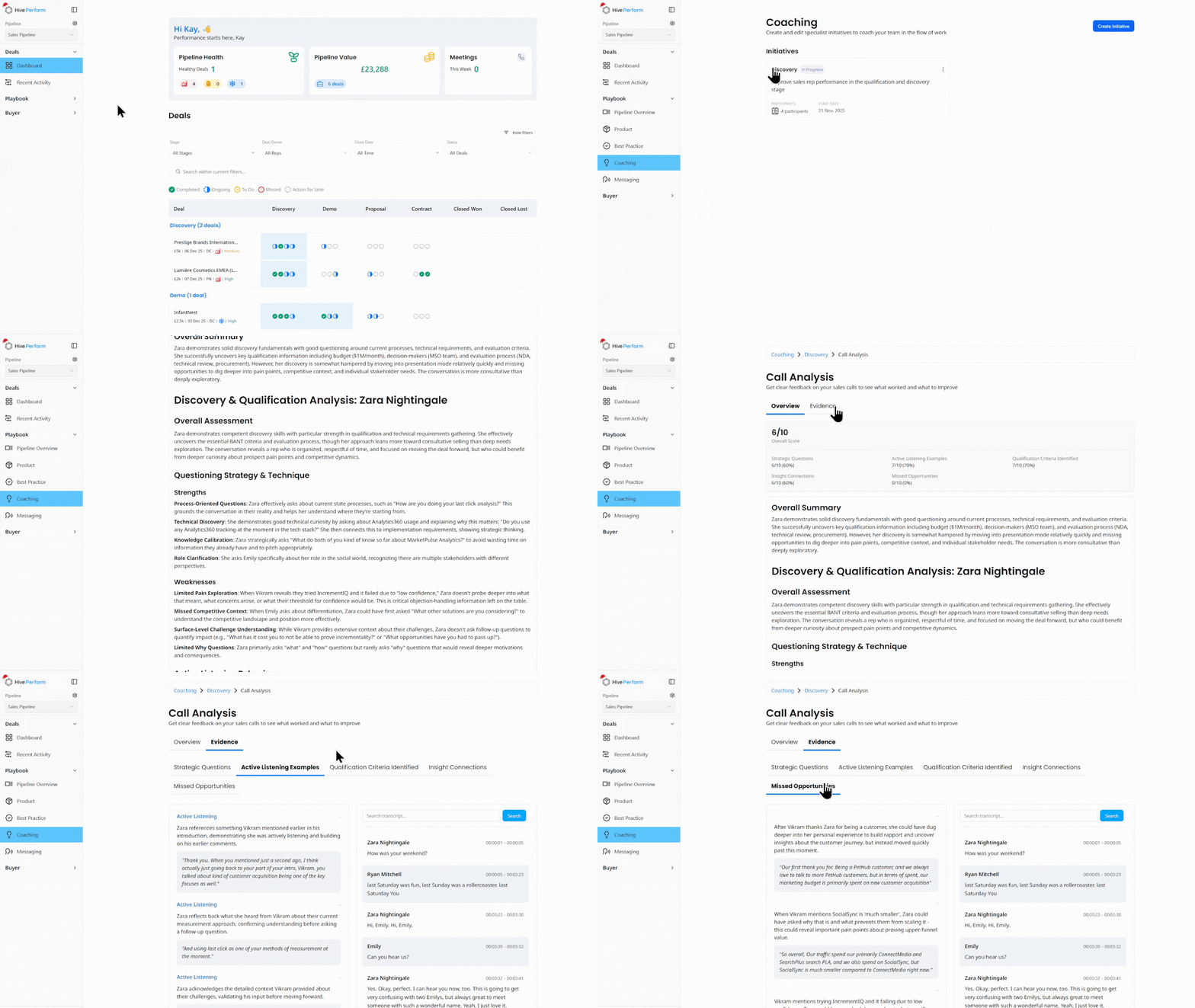
Alongside the messaging feedback you receive after calls, your manager may run Coaching Initiatives that focus on a specific skill or behaviour (for example, discovery quality, active listening, or qualification rigour).
When an Initiative is active, each qualifying call you make is automatically scored from 0 to 10 against the objectives your manager has defined. You will receive a feedback email after every qualifying call that includes your overall score, a breakdown by objective, what you did well, missed opportunities, and practical guidance you can apply on your next call.
These emails are designed to land while the conversation is still fresh, so you can course-correct in real time rather than waiting for a weekly review.
How to get the most out of Initiatives as an AE:
- Read the feedback email shortly after each call and pick one or two specific things to apply next time.
- Compare your scores against the stated objectives to understand what "good" looks like for that particular coaching focus.
- Use the feedback to prepare for 1:1s with your manager. It gives both of you a concrete starting point rather than relying on memory.
- Track your trend over time rather than fixating on any single score. The goal is steady improvement, not perfection on every call.
Each feedback email links back to Hive Perform where you can see your full scorecard and review how your scores are trending across the Initiative.
Quick-Start Checklist
To get the most out of Hive from day one:
- Record every external sales call. No recording means no analysis.
- Make sure meetings are in your calendar and synced to your CRM with the correct contacts and deal associations.
- Keep your deal stages up to date in the CRM. Hive's coaching and action tracking is stage-aware, so incorrect stages lead to less relevant feedback.
- Read your post-call feedback emails within a few hours of each call. Capture one thing to do next time and one thing to avoid.
- Try the AI assistant on a deal page when you need a quick answer about any deal.
- Check the Messaging Playbook in the platform to familiarise yourself with how Zip talks about its products and the objection-handling guidance.
- Review the Actions Playbook to understand what is expected at each deal stage, and track your adherence as deals progress.
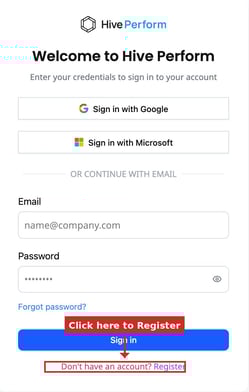
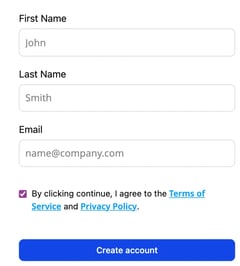
 TEST TEst