.png?width=24&height=25&name=Network%201%20(1).png)


This guide walks through how to create and manage Messaging Playbooks in Hive Perform, and how both leaders and reps should use messaging feedback in practice.
You’ll learn how Messaging Playbooks connect your positioning and talk tracks to real sales conversations, helping teams reinforce, evolve, and scale messaging over time.
What is a Messaging Playbook?
Most teams document messaging in decks, one-pagers, or enablement tools. Messaging Playbooks go a step further by showing how that messaging is actually used in real sales conversations.
A Messaging Playbook is a living framework that defines what good messaging looks like, evaluates real sales calls against that framework, and delivers coaching to improve consistency and effectiveness.
Each Messaging Playbook:
-
Captures your value propositions, selling points, proof points, and objections
-
Evaluates real sales calls against that messaging
-
Scores messaging execution on a consistent 0–10 scale
-
Delivers rep-level feedback after every call
-
Evolves over time based on what resonates with buyers
Messaging Playbooks are designed to be living systems, not static documentation..gif?width=1536&height=864&name=Untitled%20design(2).gif)
When to use Messaging Playbooks
You might create a Messaging Playbook when you want to:
-
Reinforce new positioning after a product or messaging launch
-
Ensure consistent messaging across reps, teams, or regions
-
Identify and phase out outdated or off-brand language
-
Improve proof-point usage and differentiation
-
Support multi-product and cross-sell conversations
-
Understand which messaging resonates most with buyers
Messaging works best when it is treated as an always-on reinforcement layer, rather than a one-time rollout.
Creating and launching a Messaging Playbook
Messaging Playbooks can be created and managed by any user with access to the platform, though in practice this is typically handled by admins, sales leaders, enablement, or product marketing.
Step 1: Create a new Messaging Playbook
Navigate to the Messaging section in the sidebar to view your active playbooks.
If you currently don't have any created, you can click the 'Edit Playbook' button to select the product in which you want to create a playbook for.
If you already have an active playbook, but want to create an additional one for a different product, you can press the 'Playbook Phrases' button in the top right corner.
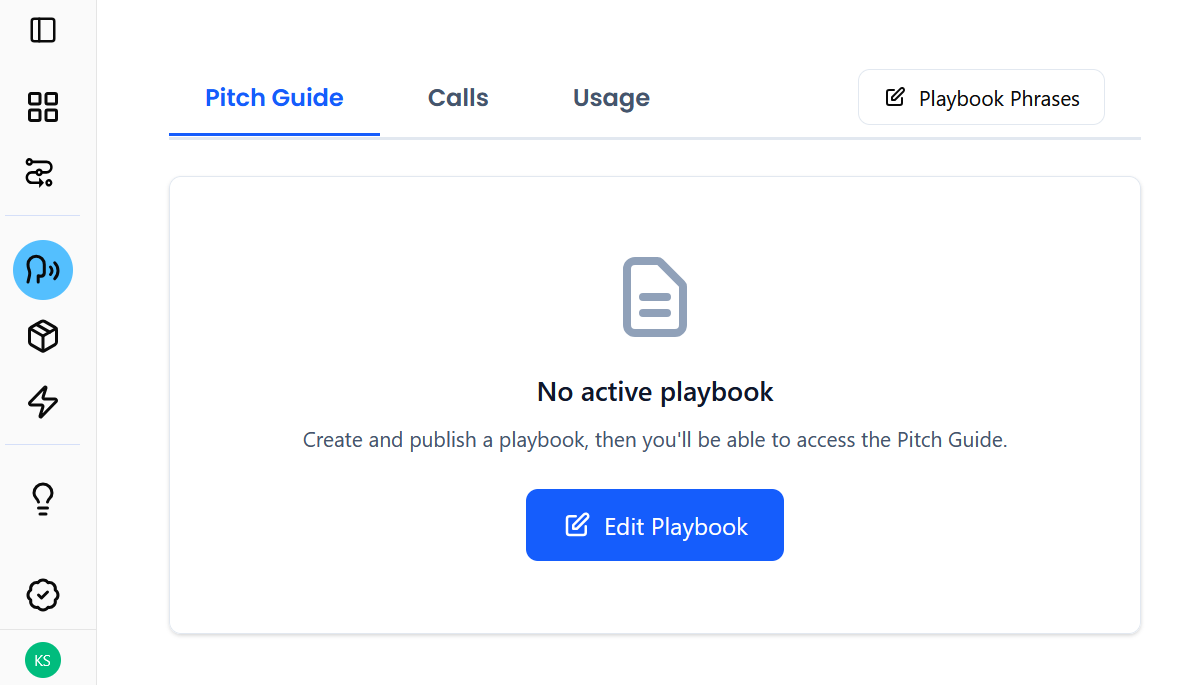
Hive automatically detects your products from logged calls or emails, meaning no manual product assignment is required in most cases.
It is worth noting that Messaging Playbooks are tied to products actively sold on a pipeline, not to products defined globally in the system.
If you expect to see a product but it is missing, make sure you have selected the correct pipeline in the top left of the screen.
If you still don't see it here, you can click the 'Add Product button'
.png?width=441&height=430&name=V1%20-%20Carousel%20for%202026%20AI%20sales%20playbook(1).png)
Step 2: Customize your messaging framework
.png?width=580&height=231&name=Your%20paragraph%20text(22).png)
Once Hive has identified one of your products, it will suggest messaging for it based on calls from your best reps.
This suggested messaging is fully customizable:
-
Edit
Manually refine wording or structure as messaging evolves. -
Phase out
Mark messaging that reps still use but should transition away from.
When phased-out messaging appears in calls, reps are coached to adopt updated language. -
Mark as adopted
Confirm that messaging is approved and actively in use by the team. -
Delete
If the messaging is outdated or incorrect.
Click into your products to manage messaging for the corresponding selling points: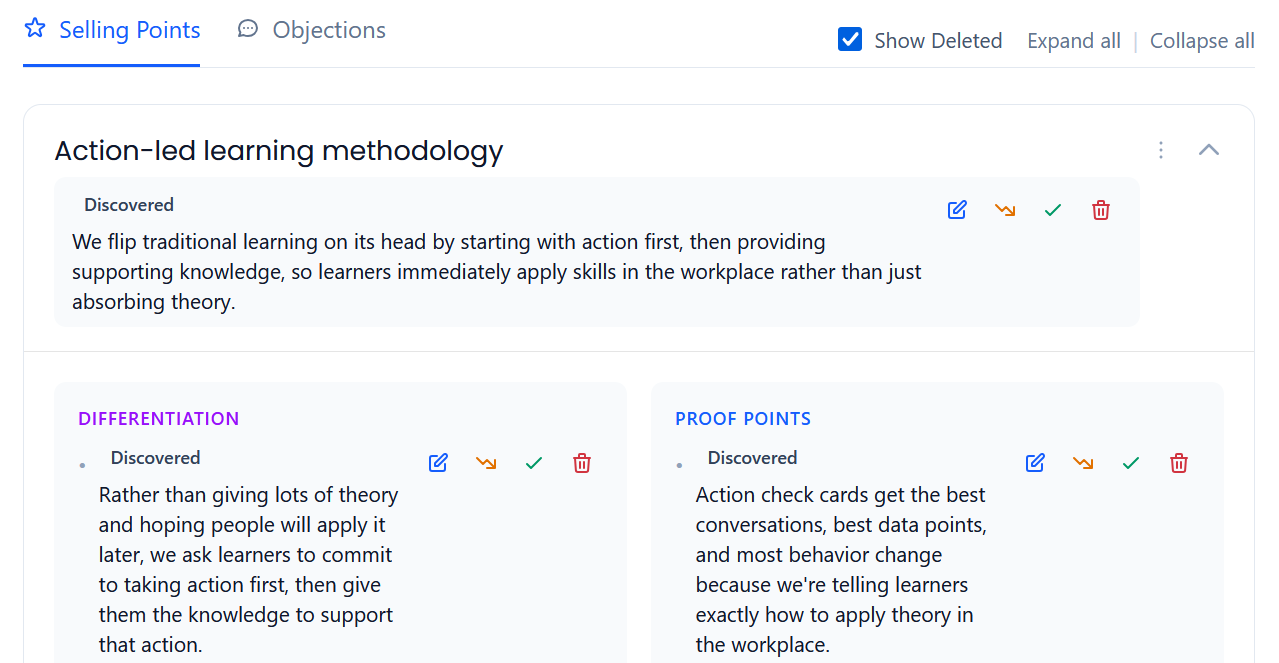
And objections: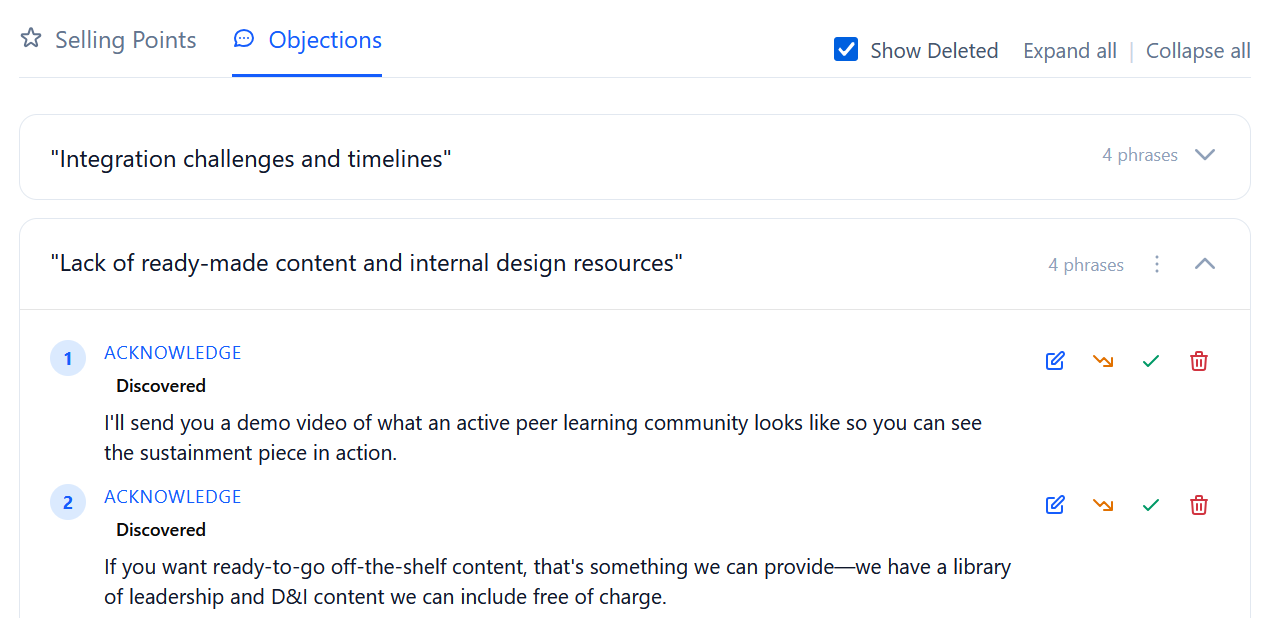
This approach allows Messaging Playbooks to remain accurate and up to date without forcing disruptive change management.
Messaging Playbooks are flexible by design and do not enforce a fixed structure. They are intended to evolve alongside your product, market, and buyer conversations.
Step 3: View your Messaging Playbook
As a rep or leader, access your messaging playbook from the messaging tab, and click on the 'Playbook Phrases' button to view your different playbooks for each product. .png?width=1865&height=879&name=Your%20paragraph%20text(23).png)
Generating AI-Optimised Talk Tracks
Hive reads your call transcripts to identify the strongest phrases your top reps use - the lines that consistently land with buyers.
You review those suggestions and choose what you want to scale or phase out across your messaging.
Hive then consolidates those proven moments into a cohesive, high-impact talk track.You’re left with the perfect sales pitch, crafted from the real conversations that win deals.
To get started, press the 'New' button in the messaging tab.
.png?width=1865&height=879&name=Your%20paragraph%20text(24).png)
Here, our chat bot will ask you for some necessary information on the talk track, such as the title and focus area.
When a talk track is created, it will generate a video of what this pitch looks like in practice. Alternatively, upload your own video for reps to learn from using the 'Set Video URL' option.
Call feedback emails: Immediate messaging coaching
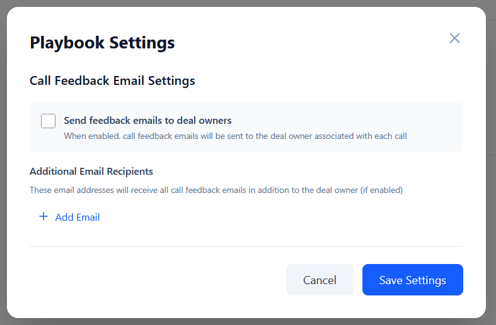
In playbook settings, enable emails for concise feedback to reps after each call.
Here, you can also add additional recipients, such as a sales leader, to receive these feedback emails too.
What the feedback email includes
Each email typically contains:
-
Overall messaging score (0–10)
-
What worked well
Specific moments where messaging was delivered effectively -
Messaging gaps or missed opportunities
Where proof points, differentiation, or responses could be stronger -
Practical next-step guidance
Concrete suggestions reps can apply on their very next call
Each email links back to Hive Perform for deeper review and evidence.
Reviewing detailed messaging feedback
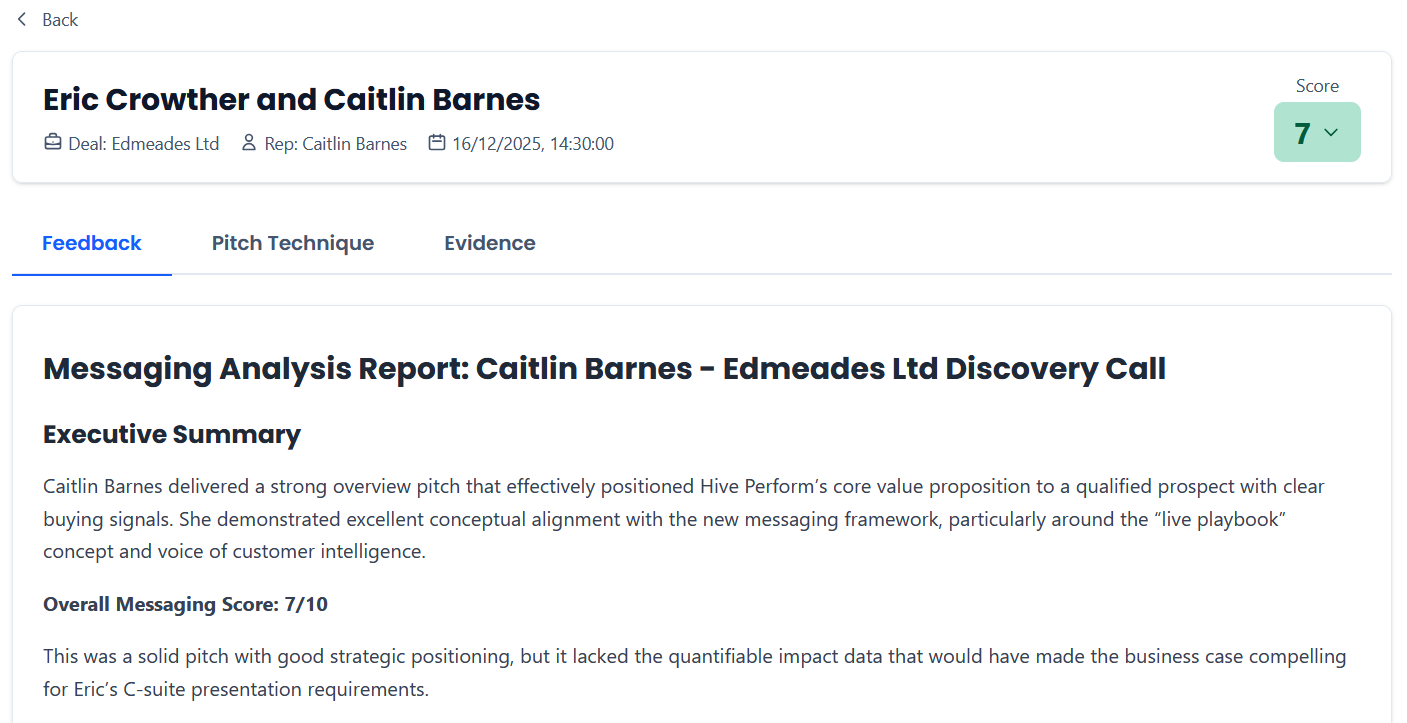
Within Messaging, click the 'Calls' tab to dive into detailed feedback for each call.
Here you will typically find:
-
Overall summary and scoring
- Messaging scorecard by feature
- Objection handling
- Missed opportunities
-
“You said this” vs “Say this” guidance
You can deconstruct the pitches of top performers in the 'Pitch Technique' tab, making it easy for new reps to learn from the best.
Find all the evidence for messaging and missed opportunities in the 'Evidence' tab to see how feedback applies in the field.
How reps should use messaging feedback
Messaging feedback is designed to support continuous improvement, not one-off evaluation.
Best practices include:
-
Reviewing feedback shortly after each call
-
Focusing on one or two messaging improvements at a time
-
Looking for patterns over multiple calls rather than single scores
-
Using feedback to prepare for coaching conversations
-
Reinforcing language that consistently resonates with buyers
Multi-product and cross-sell messaging
Messaging Playbooks are surfaced based on the products actively sold on the pipeline a call belongs to.
If a product is not sold on a given pipeline, it will not appear as an available Messaging Playbook for calls on that pipeline, even if it exists elsewhere in your product catalog.
This prevents reps from being coached on messaging that is not relevant to the deal they are working.
Evaluating multiple products in a single conversation
When multiple products are sold on the same pipeline and discussed in a call, Messaging Playbooks can evaluate each product independently.
Hive Perform can:
-
Detect which products are being discussed
-
Evaluate messaging accuracy for each product
-
Identify missed cross-sell opportunities
-
Highlight buyer signals that align with another product offering
For example, a rep may deliver strong messaging for one product while missing an opportunity to position another that the buyer signals interest in.
This capability is especially valuable for teams selling platforms, bundles, or multiple offerings within the same pipeline.
Summary
Messaging Playbooks turn positioning into execution.
By evaluating real sales conversations against a living messaging framework, Hive Perform helps teams see what’s working, what’s drifting, and how to improve consistency at scale.
Used well, Messaging Playbooks help teams move beyond documentation and build repeatable, confident messaging habits in real customer conversations.